LiveF1 - A Formula 1 Data Analysis and Streaming Package
31 Oct 2026Sometimes you crave for getting the data behind the thing you love. Since I started following F1, I have been curious about the data analysis and the AI behind the races, before and during a weekend. The Data Screen in F1 TV was interesting, with its numbers and visuals, but for a data scientist it was not enough. I started following a couple of blog authors and content creators, and I loved the idea of explaining and building the story of a race with data. But where was the data coming from?
Quietly, F1 publishes it at livetiming.formula1.com. So quietly that there is no documentation: not for the data, the API endpoints, the formats, or even how to access it. I read open-source projects that use livetiming to learn how it works and what the endpoints are.
My understanding of the endpoints, and my project
LiveF1, were strongly influenced by FastF1. I truly thank its authors for their work.
Then I wanted to build LiveF1.
Introducing LiveF1
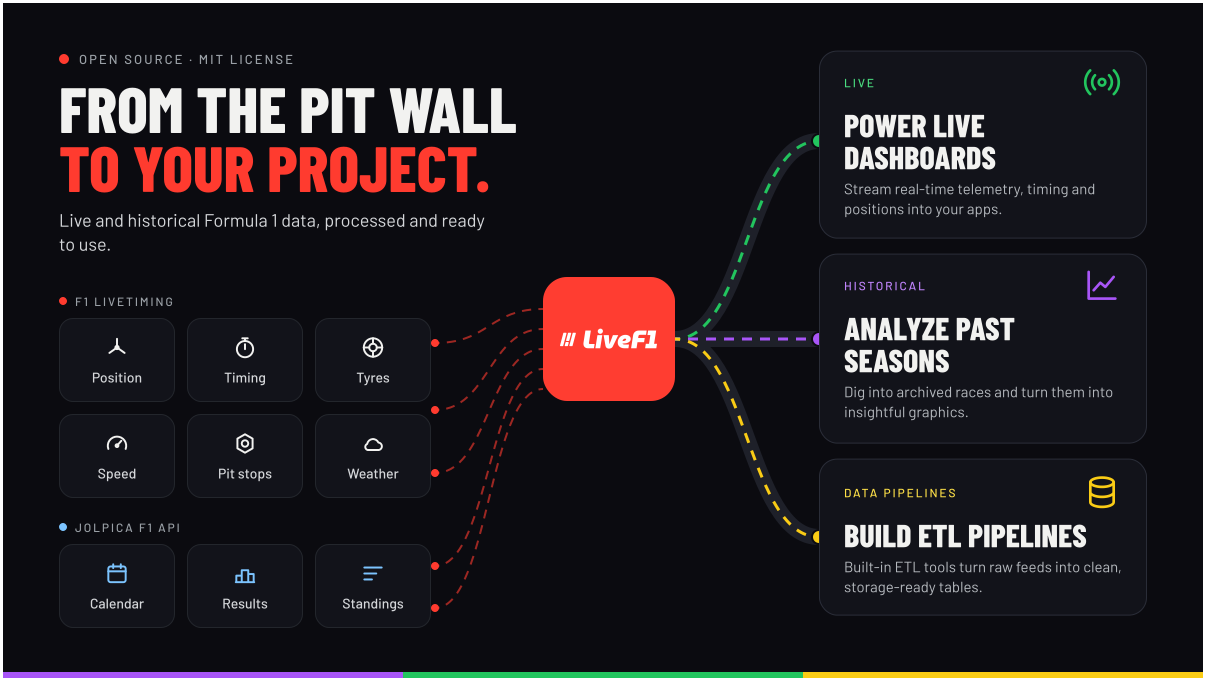
LiveF1 is a Python package for Formula 1 timing. It loads a finished session from the archive, or it sits on the live feed while a session is still running, and it turns both into tables you can analyse.
pip install livef1
The data comes from two places. The official live timing archive holds the high-frequency record of a session: timing, car channels, position, weather, tyres, race control. That archive asks for an F1 account with an active F1TV subscription; livef1.login() signs in, and LiveF1 Docs explains how. The championship around the session — seasons, calendars, drivers, constructors, results, standings — comes from the Jolpica F1 API, through a companion library called BaseF1. Those calls need no account.
A historical session is a few lines. generate() downloads the topics the tables depend on and builds them. After that, session.laps and session.carTelemetry are dataframes.
import livef1

session = livef1.get_session(
    season=2026,
    meeting_identifier="Spa",
    session_identifier="Race",
)
session.generate()

laps = session.laps
telemetry = session.carTelemetry
The same install listens live. You name the topics, register a function, and run() blocks until you stop it. records is a dict keyed by topic.
from livef1.adapters import RealF1Client

client = RealF1Client(topics=["CarData.z", "Position.z"])

@client.callback("telemetry")
async def handle_data(records):
    for topic, rows in records.items():
        print(topic, len(rows))

client.run()
The rest of this post is why those two snippets are short. The feed is not a table. Two sources disagree about names. Samples from the car and samples of its position do not share a timestamp. Nothing in the feed marks the start line.
Data Sources
Livetiming
livetiming.formula1.com is the timing archive and the live hub. A session is a directory of topics. Each topic is a JSON document, or a compressed stream when the name ends in .z. A message is rarely a complete row. TimingData sends the field that just changed: a sector time, a pit entry, an interval to the car ahead. CarData.z sends channels — rpm, speed, gear, throttle, brake, DRS — for each car, on the car clock. Position.z sends X, Y, and Z on its own clock. Around those sit TyreStintSeries, TrackStatus, RaceControlMessages, WeatherData, PitStopSeries, SessionStatus, DriverList, and others. Any of them is available once you have a session:
timing = session.get_data("TimingData")
cars = session.get_data("CarData.z")
get_data returns a dataframe. The first call downloads the topic. The next call reads it from the session, unless you pass force=True.
You can see the full list and explanation of the livetiming data topics here: LiveTiming Data Topics
Jolpica
Jolpica is the Ergast-style record of the sport. Seasons, the race calendar, circuits, drivers, constructors, results, and the championship standings. LiveF1 uses it to build the objects around a session: get_season, get_meeting, the driver list on the meeting, the standings. It has no throttle trace and no car position at 3 Hz. It does have the answer to “what races exist in 2024, and who finished them.”
Have a look to understand the data: Jolpica F1 API
High-frequency samples stay on livetiming. The championship stays on Jolpica. The session object is the seam: you name a year, a meeting, and a session, and the library decides which source can answer.
How to Search A Session? How to Reconcile Different Data Sources?
Asking for "Spa" has to survive an index that says Belgian Grand Prix in the data, a circuit file that says Spa-Francorchamps, and a year in which the livetiming index is missing the meeting entirely. LiveF1 matches the text you typed with Jaccard overlap on the words and with Jaro-Winkler similarity. If it cannot find a matching meeting, it suggests possible ones.
Let’s get the Belgian GP. Its official name is “FORMULA 1 MOËT & CHANDON BELGIAN GRAND PRIX 2026”, and people call it “Spa”, after the circuit, “Spa-Francorchamps”. The query “Spa” is found inside the circuit name:
import livef1

session = livef1.get_session(
    season = 2026,
    meeting_identifier = "Spa",
    session_identifier = "Race"
)
00:00:01 - livef1 - Selected meeting/session is:
	Meeting Offname : FORMULA 1 MOËT & CHANDON BELGIAN GRAND PRIX 2026
	Meeting Name : Belgian Grand Prix
	Meeting Circuit Shortname : Spa-Francorchamps
00:00:01 - livef1 - Got the meeting.
00:00:01 - livef1 - Selected meeting/session is:
	session_name : Race
Now search for “belgium”, which appears nowhere in the session information. LiveF1 suggests a few alternative queries:
import livef1

session = livef1.get_session(
    season = 2026,
    meeting_identifier = "belgium",
    session_identifier = "Race"
)
23:38:23 - livef1 - The identifier couldn't be found.
23:38:23 - livef1 - LiveF1Error -
The searched query 'belgium' not found in the table. Did you mean one of these :

	Meeting Offname : FORMULA 1 MOËT & CHANDON BELGIAN GRAND PRIX 2026
	Meeting Name : Belgian Grand Prix
	Meeting Circuit Shortname : Spa-Francorchamps
	> Suggested search queries : [['moët', 'chandon', 'belgian', '2026'], ['belgian'], ['spa', 'francorchamps']]

	Meeting Offname : FORMULA 1 QATAR AIRWAYS AZERBAIJAN GRAND PRIX 2026
	Meeting Name : Azerbaijan Grand Prix
	Meeting Circuit Shortname : Baku
	> Suggested search queries : [['qatar', 'airways', 'azerbaijan', '2026'], ['azerbaijan'], ['baku']]
Data Processing and The Lakes
Loading the Data
We found the session, so the next step is loading its data by topic name. You can look the topic names up in the LiveF1 Docs, or print them with .print_topic_names().
session.print_topic_names()
Session_Info :
	 Details about the current session.
Archive_Status :
	 Status of archived session data.
Track_Status :
	 Current conditions and status of the track.
Session_Data :
...
Now we can pick a topic and load it. .get_data(<topic_name>) downloads the topic if it has not been loaded yet, and returns it as a pandas dataframe.
session.get_data("Session_Data") # SessionData also works.
    session_key                       Utc   Lap TrackStatus SessionStatus
0         11334  2026-07-19T12:08:05.973Z   0.0         NaN           NaN
1         11334  2026-07-19T12:08:09.649Z   1.0         NaN           NaN
2         11334  2026-07-19T12:09:32.739Z   NaN    AllClear           NaN
3         11334  2026-07-19T12:09:54.619Z   NaN      Yellow           NaN
..          ...                       ...   ...         ...           ...
72        11334  2026-07-19T14:28:34.739Z   NaN         NaN      Finished
73        11334  2026-07-19T14:34:05.928Z   NaN         NaN     Finalised
74        11334  2026-07-19T14:34:05.928Z   NaN         NaN          Ends
This dataframe is parsed from the raw data. To see the raw data itself:
session.data_lake.get("bronze", "SessionData").raw
What bronze and the data lake mean is the next section.
Data Processing
Data processing happens in two parts:
- Processing the raw data (a.k.a. ETL).
- Transforming the raw data into entity tables, in a Medallion Architecture.
Processing the raw data. Each topic in livetiming has its own JSON structure, and its own parser. A parser walks the nested JSON and yields a flat record: session key, timestamp, driver number, and the fields that message carried.
Each topic’s structure is different, and so is the information it carries, so each parser is tailored to its topic. For example, CarData.z has its own numbered channels which are mapped by its parser function (0 is rpm, 2 is speed, 4 is throttle).
The Medallion Architecture. A medallion architecture keeps the same data in layers. Bronze stays close to the source. Silver is cleaned and joined into the entities you actually analyse. Gold is the aggregate on top of those, when you want one. Each layer is allowed to throw information away, because the layer under it is still there.
I used it because a livetiming message is not the row I want to plot. TimingData sends the field that just changed. CarData.z and Position.z do not share a clock. If I only kept the parsed topics, every chart would rebuild a lap and join the two telemetry feeds again. If I only kept laps and carTelemetry, the original message would be gone once a sector update had been folded into a lap. The layers keep both. A new question is a function over a table that already exists, and generate() downloads only the topics that function needs.
The session holds one data lake in memory, split into three. Bronze, silver, and gold are each a dict of tables, with a note of which level a name belongs to.
Bronze is the parser’s output. A timing row can have a sector time and nothing else. A car row can have a speed and no coordinate. session.get_data("TimingData") returns that frame. The JSON it was parsed from stays on the same table, which is what .raw reads.
Silver is one row per thing you want to ask about: a lap, a telemetry sample, a race-control message. Gold is a summary of a silver table. The package ships no gold tables. generate() stops after silver unless you pass gold=True.
Generate Default. generate() registers three default silver tables before it downloads anything;
-
lapsis one row per driver per lap. It readsTimingData,RaceControlMessages,TyreStintSeries, andTrackStatus. The builder keeps a lap open and fills whatever the latest message brought, then appends the row when the lap closes. -
carTelemetryis one row per sample. It readsCarData.z,Position.z,TyreStintSeries,TrackStatus,TimingData, andlaps, so the lap table is built first and each sample can carry a lap number.track_regionsis optional. A circuit with no map still produces the telemetry table, and the region column stays empty. -
raceControlMessagesreadsRaceControlMessagesand turns the message text into a category, a scope, and a flag.
After the three are registered, generate() collects every bronze topic they name, downloads each topic once, and builds the tables in dependency order. Nothing is downloaded twice, and a circular dependency is caught before anything is built.
Generate Custom. Here is the design intention. The heaviest part of LiveF1 is not downloading and parsing the data, but building the silver tables, which are the useful ones. I defined three default silver tables, but your project may need tables with different purposes. So a developer can use only the three defaults, or register their own functions for project-specific tables before the single run of generate().
A table of your own is the same mechanism. You decorate a function, name the tables it reads, and generate() calls it with those dataframes. The arguments arrive in the order of source_tables. include_session=True puts the session object first, which is how the function reaches session.drivers and turns a racing number into a name. A name in optional_source_tables arrives as None when the session does not have it, so the function can still run.
@session.create_silver_table(
    table_name="ValidLaps",
    source_tables=["laps"],
)
def valid_laps(laps):
    return laps[laps["PitIn"].isna() & laps["PitOut"].isna() & ~laps["IsDeleted"]]

session.generate()
valid = session.ValidLaps
A source can be a bronze topic or another silver table. generate() walks those names, including the tables your table depends on, and sorts them so a table is built after everything it reads. If ValidLaps read a table that itself read ValidLaps, there is no such order, and generation stops on the circular dependency. A gold table is the same decorator one level up, and it is built only when you ask. SectorDiff over laps, and SectorLeaders over SectorDiff, are the pair in the registration example.
session.generate(silver=True, gold=True)
leaders = session.SectorLeaders
Three ways to read a level back: session.get_data("TimingData") for bronze, session.laps after generate() for silver, and session.SectorLeaders after generate(gold=True) for gold. get_data takes level="silver" or level="gold" for the same frames.
Some Data Processing Approaches
The topics with the highest granularity, around 0.3 s, are telemetry (CarData) and position (Position). That sounds fine, but in motor sport it loses information. At around 350 km/h, a car covers about 29–30 metres between two consecutive records, $t_1$ and $t_2$. Say you want to measure braking at the end of a long straight, where cars reach top speed. A driver brakes 0.01 s after $t_1$, about 1 metre later, but the data only shows the brake flag and the lower speed at $t_2$. That is the information loss. We can estimate what happened between samples, but not measure it.
Interpolation
CarData and Position are different topics, sampled at different times. The silver function that builds .carTelemetry outer-joins them on driver and UTC. Since sampled times are not matching, a speed sample with no position stays. A position sample with no throttle stays. Both would disappear in an inner join, and the trace would have holes exactly where one feed blinked.
The gaps are filled per column. The method is in interpolation_map, and it follows the shape of the channel.
| Column | Fill |
|---|---|
| X, Y, Z | Quadratic. The car is on a curve. |
| RPM, throttle | Linear. |
| Speed | Along the timestamp index. |
| Brake, DRS, gear, status | Carried forward. These hold a value, then step. |
A column with fewer than a fifth of its values present is left as it arrived. Interpolating a channel that is almost empty invents a line the car never sent.
Lap number is stamped by joining each driver’s lap-start times and carrying the number forward, so a sample knows which lap it belongs to. Tyre compound and tyre age are joined from the stint series and carried forward. Track status is joined on the session timestamp. The gap to the car ahead is joined from timing data. The figure is a few seconds of made-up samples, so the gaps are easy to see. The points are the messages. The line is the table after the fill.
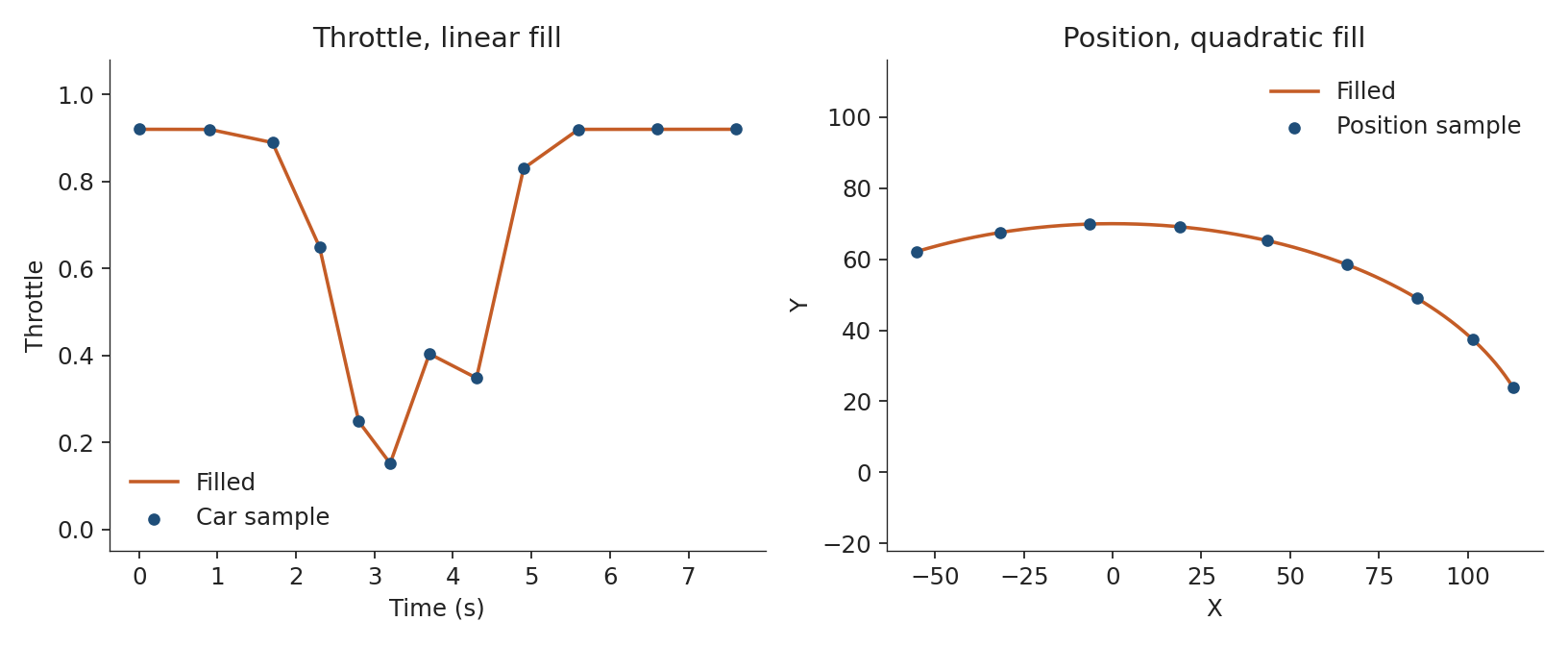
The samples are still timestamps. A corner, in this table, becomes a place on the lap only after the start line is known.
Where the lap starts: Distance
Local $(X, Y)$ coordinates say where the car is in 2D space, not how far round the lap it is. Distance in carTelemetry is metres from the start/finish line, so two laps can be compared corner by corner.
But $(X, Y)$ coordinates do not give the start/finish line, and they do not give a direction of travel. Without those, distance along the lap has an arbitrary zero: wherever the first sample of the lap happened to fall.
The obvious summary of “where laps end” is the average of the last position sample of each lap. That average is the wrong point, for two reasons.
First, the last sample of a lap is the last packet before the next lap number, not the instant the car crossed the line. Cars are sampled at slightly different moments, so the points form a smear along the track rather than a dot on the line. The mean sits in the middle of the smear. The line the cars are crossing is the edge of the smear, on the side they are heading.
Second, pit entry, pit exit, and deleted laps put last-samples far from the racing line. A mean over every lap is pulled toward the pit lane. Those laps have to leave the set before any percentile is taken.
LiveF1 ships a coordinate and a direction per circuit, computed by find_track_start.py and loaded with the package. The script builds laps and telemetry for a race at that circuit, then does the following.
Keep laps where PitIn is empty, PitOut is empty, and IsDeleted is false. Take the last telemetry sample of each remaining lap. That cloud is “where the car was as the lap ended.”
Direction comes from the first two on-track samples with a position after lap 1. If those samples are $(x_0, y_0)$ and $(x_1, y_1)$:
\[\begin{aligned} x_{\text{coeff}} &= \frac{x_1 - x_0}{|x_1 - x_0|} \\ y_{\text{coeff}} &= \frac{y_1 - y_0}{|y_1 - y_0|} \end{aligned}\]Each coefficient is +1 or −1. It says which way the cars are traveling on that axis. It is a direction, not a speed.
Outliers are dropped with an interquartile fence on each axis. For a coordinate $c$, with $Q_1$ and $Q_3$ the 25th and 75th percentiles and $\text{IQR} = Q_3 - Q_1$, a point is kept when
\[Q_1 - 1.5 \cdot \text{IQR} \le c \le Q_3 + 1.5 \cdot \text{IQR}\]on both X and Y. What remains is the racing-line smear.
The start is a high percentile of that smear, taken on the side the cars are heading. With the percentile set at 95:
\[\begin{aligned} p_x &= \begin{cases} 5 & \text{if } x_{\text{coeff}} < 0 \\ 95 & \text{otherwise} \end{cases} & p_y &= \begin{cases} 5 & \text{if } y_{\text{coeff}} < 0 \\ 95 & \text{otherwise} \end{cases} \\[4pt] \text{start}_x &= \operatorname{percentile}(X_{\text{kept}}, p_x) & \text{start}_y &= \operatorname{percentile}(Y_{\text{kept}}, p_y) \end{aligned}\]Heading toward decreasing X, the line is the low end of the cloud, so the percentile flips from 95 to 5. The same for Y. The mean of the kept points stays in the middle. The percentile sits on the edge the arrow points toward.
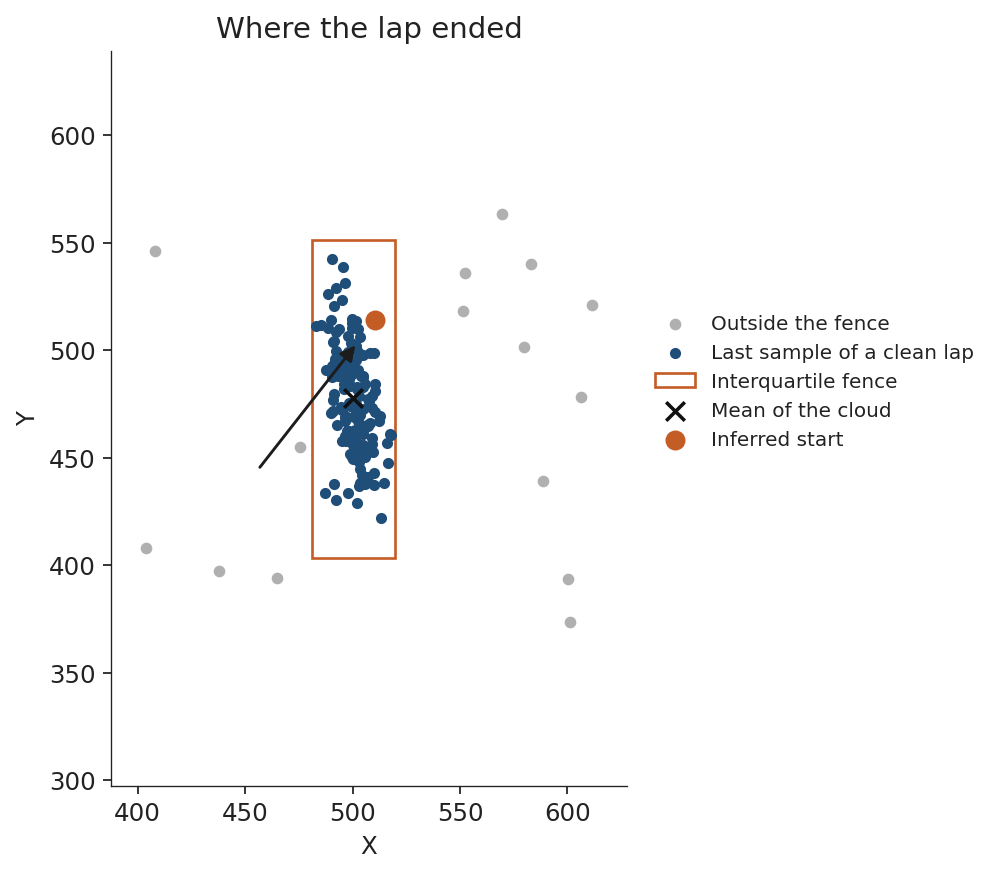
The points in the figure are synthetic, so the fence, the mean, and the edge are easy to separate. The same function, on archived races, filled the file the package loads. For Spa-Francorchamps it recorded a start near (−435, 1307), with the cars heading toward negative X and positive Y.
It is a heuristic, and it has limits. The direction comes from just two samples, so a start line in a corner can give the wrong sign on one axis. The percentile is taken on X and Y separately, so on a diagonal straight the inferred start is a corner of the smear’s bounding box, a few metres from the real line. For comparing laps against each other, that constant offset does not matter.
That coordinate is what add_distance_to_lap uses. Speed is in km/h. The time step is in seconds. The running distance, in metres, is the trapezoid of speed, with the first step set to zero:
Dividing by 3.6 converts km/h to m/s. $D_i$ is metres from the first sample of the lap, which is not the line. The first sample is shifted onto the line by the straight-line distance to the inferred start. The position frame is in tenths of a metre, so that distance is divided by 10 to share a unit with $D_i$. The sign $s$ is +1 when the first sample is ahead of the line along both coefficients, and −1 otherwise:
\[\begin{aligned} \text{offset} &= \frac{s \cdot \sqrt{(x_0 - \text{start}_x)^2 + (y_0 - \text{start}_y)^2}}{10} \\ \text{Distance} &= \text{offset} + D \end{aligned}\]A corner is then a distance along the lap, not a timestamp. The same coordinate places each sample in a track region when the circuit map is available. If a circuit has no start line, distance and region stay empty and the rest of the telemetry table is still built.
The Live Data
The archive and the live hub speak the same topics, and the live client runs them through the same parsers. You choose the topics, register one or more functions, and call run().
from livef1.adapters import RealF1Client

client = RealF1Client(topics=["TimingData", "Position.z"])

@client.callback("gaps")
async def gaps(records):
    for row in records.get("TimingData", []):
        gap = row.get("IntervalToPositionAhead_Value")
        if gap:
            print(row["DriverNo"], gap)

@client.callback("cars")
async def cars(records):
    rows = records.get("Position.z", [])
    if rows:
        print("positions", len(rows))

client.run()
The decorated function takes one argument, and its name is records. That is the contract the decorator checks. The string you pass to callback is the name of the handler, so you can register several and each of them sees every topic you subscribed to. A message carries the fields that changed, which is why the gap callback stays quiet on a sector update.
Final Words
I started this project because I wanted to tell the story of a race with data, and I did not know where the data came from. Building LiveF1 answered that question. Now the archive is a few lines away, the live feed is a callback, and a lap is a row I can plot. That was the goal, and it is how I work now: I create content about F1 data analysis at x.com/f1bydata, and LiveF1 is under every chart.
None of this would exist without the people who mapped the territory first. Thanks to the creators of FastF1, MultiViewer, and Jolpica, for making their work open source and for providing data about the races, the tracks, and the championships.
LiveF1 is an unofficial project and is not affiliated with Formula 1.